

 Register
 USD
 INR
 AED






 13 Nov, 2026, 00:00 AM






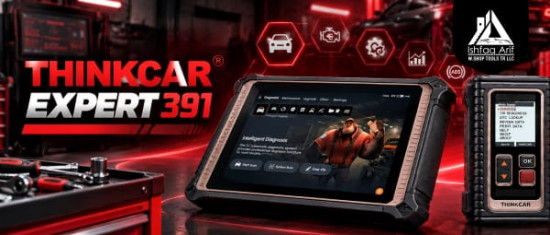
Finding a fault in a vehicle starts with the right checks. The Thinkcar Expert 391 helps technicians scan vehicle systems, read fault codes, and check vehicle data. It is a Thinktool product made for automotive workshops. It supports different vehicle brands and helps technicians check problems linked to the engine, ABS, and transmission. It also supports ECU functions and reads vehicle data in real time. Below, we will discuss more.
The Thinkcar Expert 391 is a diagnostic and programming tool for vehicle checks. It connects to a vehicle system and helps technicians read data and find faults. They can use it to check fault codes and review vehicle systems during repair work.
The main product details are:
Product name: Thinkcar Expert 391
Brand: Thinktool
Product code: T-391
Product type: Programming tool
The tool supports work on different vehicle brands. This makes it an option for workshops that need to check more than one type of vehicle.
The Thinkcar Expert 391 has several features for vehicle checks. These features help technicians scan systems and review the data they find.
Vehicle system scan: It scans vehicle systems to help find faults.
Fault code reading: It reads fault codes stored in the vehicle.
Fault code clearing: It supports clearing fault codes.
ECU functions: It supports ECU functions and system checks.
Live data: It reads vehicle data in real time.
Multi-brand support: It works with different vehicle brands.
Clear display: It shows details on the screen.
These features help technicians check vehicle systems and get information about faults.
When a technician connects the Thinkcar Expert 391 to a vehicle, the tool reads vehicle data. The technician can then scan systems and check the fault codes shown by the tool.
It can help with checks related to:
Engine: Read fault codes linked to engine problems.
ABS: Check fault codes linked to the ABS system.
Transmission: Review faults linked to the transmission.
Vehicle systems: Scan systems and read available data.
Technicians can also use the tool to clear fault codes and check the vehicle after repair work. The data helps them review the vehicle's condition during these checks.
Workshops often need to check vehicles from different brands. The Thinkcar Expert 391 supports different brands and offers several functions for vehicle checks.
It helps technicians scan systems, read fault codes, and check live data. It also supports ECU functions and system checks. These features make it useful for daily diagnostic work in automotive workshops.
Before choosing the Thinkcar Expert 391, check its details and make sure its functions suit your workshop needs.
|
Product detail |
Information |
|
Product name |
Thinkcar Expert 391 |
|
Brand |
Thinktool |
|
Product code |
T-391 |
|
Product type |
Programming tool |
|
Main functions |
System scans, fault code checks, ECU functions, and live data |
Also check whether its vehicle support and functions match the work you handle.
The Thinkcar Expert 391 supports vehicle system scans, fault code reading, and live data checks. It also supports ECU functions and works with different vehicle brands. These features help technicians check vehicle faults and review repairs.
At Ishfaq Arif Workshop Tools Trading LLC, we supply automotive tools and workshop equipment. Contact us to ask about the Thinkcar Expert 391, its price, and its availability.